Organizational Chart

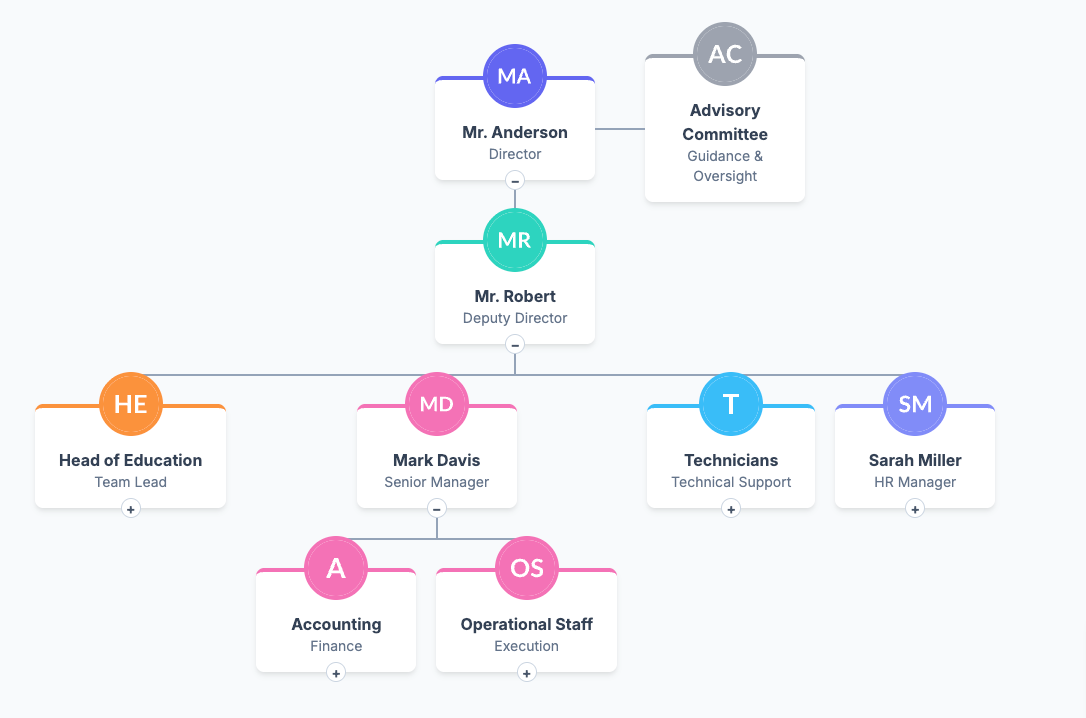
A simple Organizational chart using tailwind css

  1
  2
  3
  4
  5
  6
  7
  8
  9
 10
 11
 12
 13
 14
 15
 16
 17
 18
 19
 20
 21
 22
 23
 24
 25
 26
 27
 28
 29
 30
 31
 32
 33
 34
 35
 36
 37
 38
 39
 40
 41
 42
 43
 44
 45
 46
 47
 48
 49
 50
 51
 52
 53
 54
 55
 56
 57
 58
 59
 60
 61
 62
 63
 64
 65
 66
 67
 68
 69
 70
 71
 72
 73
 74
 75
 76
 77
 78
 79
 80
 81
 82
 83
 84
 85
 86
 87
 88
 89
 90
 91
 92
 93
 94
 95
 96
 97
 98
 99
100
101
102
103
104
105
106
107
108
109
110
111
112
113
114
115
116
117
118
119
120
121
122
123
124
125
126
127
128
129
130
131
132
133
134
135
136
137
138
139
140
141
142
143
144
145
146
147
148
149
150
151
152
153
154
155
156
157
158
159
160
161
162
163
164
165
166
167
168
169
170
171
172
173
174
175
176
177
178
179
180
181
182
183
184
185
186
187
188
189
190
191
192
193
194
195
196
197
198
199
200
201
202
203
204
205
206
207
208
209
210
211
212
213
214
215
216
217
218
219
220
221
222
223
224
225
226
227
228
229
230
231
232
233
234
235
236
237
238
239
240
241
242
243
244
245
246
247
248
249
250
251
252
253
254
255
256
257
258
259
260
261
262
263
264
265
266
267
268
269
270
271
272
273
274
275
276
277
278
279
280
281
282
283
284
285
286
287
288
289
290
291
292
293
294
295
296
297
298
299
300
301
302
303
304
305
306
307
308
309
310
311
312
313
314
315
316
317
318
319
320
321
322
323
324
325
326
327
328
329
330
331
332
333
334
335
336
337
338
339
340
341
342
343
344
345
346
347
348
349
350
351
352
353
354
355
356
357
358
359
360
361
362
363
364
365
366
367
368
369
370
371
372
373
374
375
376
377
378
379
380
381
382
383
384
385
386
387
388
389
390
391
392
393
394
395
396
397
398
399
400
401
402
403
404
405
406
407
408
409
410
411
412
413
414
415
416
417
418
419
420
421
422
423
424
425
426
427
428
429
430
431
432
433
434
435
436
437
438
439
440
441
442
443
444
<!DOCTYPE html>
<html lang="en">
<head>
    <meta charset="UTF-8">
    <meta name="viewport" content="width=device-width, initial-scale=1.0">
    <title>Modern Organizational Chart</title>
    <script src="https://cdn.tailwindcss.com"></script>
    <link href="https://fonts.googleapis.com/css2?family=Inter:wght@400;500;600;700&display=swap" rel="stylesheet">
    <style>
        :root {
            --color-blue: #6366f1;
            --color-teal: #2dd4bf;
            --color-orange: #fb923c;
            --color-pink: #f472b6;
            --color-sky: #38bdf8;
            --color-gray: #9ca3af;
            --color-indigo: #818cf8;
        }

        html, body {
            height: 100%;
            margin: 0;
            overflow: hidden; /* Prevents scrollbars on the body */
        }

        body {
            font-family: 'Inter', sans-serif;
            background-color: #f1f5f9;
            color: #1e293b;
            display: flex;
            flex-direction: column;
        }

        .page-wrapper { /* New class for the main container div */
            display: flex;
            flex-direction: column;
            flex-grow: 1; /* Allow this wrapper to grow and fill space */
            min-height: 0; /* Fix for flexbox overflow issue in some browsers */
        }

        .org-chart {
            display: flex;
            overflow: hidden;
            cursor: grab;
            user-select: none;
            background-color: #f8fafc;
            border-radius: 0.5rem;
            box-shadow: 0 4px 6px -1px rgb(0 0 0 / 0.1), 0 2px 4px -2px rgb(0 0 0 / 0.1);
            flex-grow: 1; /* Make the chart container fill available vertical space */
        }

        .org-chart ul {
            padding-top: 30px;
            position: relative;
            display: flex;
            justify-content: center;
        }

        .org-chart > ul {
            transform-origin: 0 0;
            transition: transform 0.2s ease-out;
        }

        .org-chart li {
            text-align: center;
            list-style-type: none;
            position: relative;
            padding: 30px 10px 0 10px;
            transition: all 0.5s;
        }

        /* --- New Node Styling --- */
        .node-wrapper {
            position: relative;
            display: inline-block;
        }
        
        .node-card {
            padding: 1rem 1.5rem;
            background-color: white;
            border-radius: 8px;
            display: inline-block;
            min-width: 160px;
            box-shadow: 0 4px 6px -1px rgba(0, 0, 0, 0.1), 0 2px 4px -1px rgba(0, 0, 0, 0.06);
            border-top: 4px solid;
            border-color: var(--node-color, var(--color-gray));
            transition: all 0.3s ease;
        }

        .node-image {
            width: 64px;
            height: 64px;
            border-radius: 50%;
            border: 4px solid;
            border-color: var(--node-color, var(--color-gray));
            background-color: white;
            position: absolute;
            top: 0;
            left: 50%;
            transform: translate(-50%, -50%);
            z-index: 1;
        }

        /* --- New Connecting Lines --- */
        /* Vertical line coming DOWN from parent node */
        .node-wrapper::after {
            content: '';
            position: absolute;
            bottom: -30px; /* should match li top padding */
            left: 50%;
            transform: translateX(-50%);
            width: 2px;
            height: 30px;
            background-color: #94a3b8;
        }
        
        /* Hide the downward line if node has no children or is collapsed */
        .node-wrapper.no-children::after,
        li.collapsed .node-wrapper::after {
            display: none;
        }

        /* Vertical line going UP from child node */
        .org-chart li::before {
            content: '';
            position: absolute;
            top: 0;
            left: 50%;
            transform: translateX(-50%);
            width: 2px;
            height: 30px;
            background-color: #94a3b8;
        }

        /* Horizontal line connecting all children */
        .org-chart li::after {
            content: '';
            position: absolute;
            top: 0;
            left: 0;
            width: 100%;
            height: 2px;
            background-color: #94a3b8;
        }

        /* Remove lines for the root node */
        .org-chart > ul > li::before, .org-chart > ul > li::after {
            display: none;
        }

        /* Adjust horizontal line for first and last child */
        .org-chart li:first-child::after { left: 50%; width: 50%; }
        .org-chart li:last-child::after { width: 50%; }
        .org-chart li:only-child::after { display: none; }

        /* --- Collapsible styles --- */
        .org-chart li > ul { display: flex; }
        .org-chart li.collapsed > ul { display: none; }
        
        .toggle-btn {
            position: absolute;
            bottom: -10px;
            left: 50%;
            transform: translateX(-50%);
            width: 20px;
            height: 20px;
            background-color: white;
            color: #475569;
            border-radius: 50%;
            display: flex;
            align-items: center;
            justify-content: center;
            font-size: 14px;
            font-weight: bold;
            cursor: pointer;
            border: 1px solid #cbd5e1;
            user-select: none;
            transition: all 0.3s ease;
            z-index: 10;
        }
        .toggle-btn:hover { background-color: #f1f5f9; transform: translateX(-50%) scale(1.1); }
        
        /* --- Advisory Node --- */
        .advisory-node {
            position: absolute;
            top: 50%;
            left: 100%;
            transform: translateY(-50%);
            padding-left: 50px;
        }
        .advisory-connector {
            content: '';
            position: absolute;
            top: 50%;
            left: 100%;
            width: 50px;
            height: 2px;
            background: #94a3b8;
        }
        .root-node-wrapper {
            position: relative;
        }

    </style>
</head>
<body class="bg-gray-100">
        <main id="chart-container" class="org-chart">
            <!-- Chart will be generated here by JavaScript -->
        </main>

    <script>
        const orgData = {
            name: 'Mr. Anderson',
            role: 'Director',
            color: 'var(--color-blue)',
            imageUrl: 'https://placehold.co/100x100/6366f1/ffffff?text=MA',
            advisory: {
                name: 'Advisory Committee',
                role: 'Guidance & Oversight',
                color: 'var(--color-gray)',
                imageUrl: 'https://placehold.co/100x100/9ca3af/ffffff?text=AC'
            },
            children: [
                {
                    name: 'Mr. Robert',
                    role: 'Deputy Director',
                    color: 'var(--color-teal)',
                    imageUrl: 'https://placehold.co/100x100/2dd4bf/ffffff?text=MR',
                    children: [
                        {
                            name: 'Head of Education',
                            role: 'Team Lead',
                            color: 'var(--color-orange)',
                            imageUrl: 'https://placehold.co/100x100/fb923c/ffffff?text=HE',
                            children: [
                                { name: 'Lectures Team', role: 'Content Delivery', color: 'var(--color-orange)', imageUrl: 'https://placehold.co/100x100/fb923c/ffffff?text=LT', children: [
                                    { name: 'John Doe', role: 'Lecturer', color: 'var(--color-orange)', imageUrl: 'https://placehold.co/100x100/fb923c/ffffff?text=JD'},
                                    { name: 'Jane Smith', role: 'Lecturer', color: 'var(--color-orange)', imageUrl: 'https://placehold.co/100x100/fb923c/ffffff?text=JS'}
                                ]},
                                { name: 'Student Coordinators', role: 'Support', color: 'var(--color-orange)', imageUrl: 'https://placehold.co/100x100/fb923c/ffffff?text=SC', children: [
                                    { name: 'Peter Jones', role: 'Coordinator', color: 'var(--color-orange)', imageUrl: 'https://placehold.co/100x100/fb923c/ffffff?text=PJ'}
                                ]}
                            ]
                        },
                        {
                            name: 'Mark Davis',
                            role: 'Senior Manager',
                            color: 'var(--color-pink)',
                            imageUrl: 'https://placehold.co/100x100/f472b6/ffffff?text=MD',
                            children: [
                                { name: 'Accounting', role: 'Finance', color: 'var(--color-pink)', imageUrl: 'https://placehold.co/100x100/f472b6/ffffff?text=A', children: [
                                     { name: 'Alice Williams', role: 'Accountant', color: 'var(--color-pink)', imageUrl: 'https://placehold.co/100x100/f472b6/ffffff?text=AW' }
                                ]},
                                { name: 'Operational Staff', role: 'Execution', color: 'var(--color-pink)', imageUrl: 'https://placehold.co/100x100/f472b6/ffffff?text=OS', children: [
                                     { name: 'Bob Brown', role: 'Operator', color: 'var(--color-pink)', imageUrl: 'https://placehold.co/100x100/f472b6/ffffff?text=BB' },
                                     { name: 'Charlie Green', role: 'Operator', color: 'var(--color-pink)', imageUrl: 'https://placehold.co/100x100/f472b6/ffffff?text=CG' }
                                ]}
                            ]
                        },
                        {
                            name: 'Technicians',
                            role: 'Technical Support',
                            color: 'var(--color-sky)',
                            imageUrl: 'https://placehold.co/100x100/38bdf8/ffffff?text=T',
                            children: [
                               { name: 'Maintenance Staff', role: 'Infrastructure', color: 'var(--color-sky)', imageUrl: 'https://placehold.co/100x100/38bdf8/ffffff?text=MS', children: [
                                    { name: 'David White', role: 'Technician', color: 'var(--color-sky)', imageUrl: 'https://placehold.co/100x100/38bdf8/ffffff?text=DW' }
                               ]},
                               { name: 'IT Support', role: 'Helpdesk', color: 'var(--color-sky)', imageUrl: 'https://placehold.co/100x100/38bdf8/ffffff?text=IT' }
                            ]
                        },
                        {
                            name: 'Sarah Miller',
                            role: 'HR Manager',
                            color: 'var(--color-indigo)',
                            imageUrl: 'https://placehold.co/100x100/818cf8/ffffff?text=SM',
                            children: [
                                { name: 'Recruitment', role: 'Talent Acquisition', color: 'var(--color-indigo)', imageUrl: 'https://placehold.co/100x100/818cf8/ffffff?text=R' },
                                { name: 'Employee Relations', role: 'Internal Affairs', color: 'var(--color-indigo)', imageUrl: 'https://placehold.co/100x100/818cf8/ffffff?text=ER' }
                            ]
                        }
                    ]
                },
            ]
        };

        function createNode(person) {
            const li = document.createElement('li');
            
            const wrapper = document.createElement('div');
            wrapper.className = 'node-wrapper';
             if (!person.children || person.children.length === 0) {
                wrapper.classList.add('no-children');
            }

            const img = document.createElement('img');
            img.src = person.imageUrl;
            img.alt = `Profile picture of ${person.name}`;
            img.className = 'node-image object-cover';
            img.style.borderColor = person.color;

            const nodeDiv = document.createElement('div');
            nodeDiv.className = 'node-card';
            nodeDiv.style.borderColor = person.color;

            const nameDiv = document.createElement('div');
            nameDiv.className = 'font-bold text-slate-700 text-md pt-6';
            nameDiv.textContent = person.name;

            const roleDiv = document.createElement('div');
            roleDiv.className = 'text-sm text-slate-500';
            roleDiv.textContent = person.role;

            nodeDiv.appendChild(nameDiv);
            nodeDiv.appendChild(roleDiv);
            wrapper.appendChild(img);
            wrapper.appendChild(nodeDiv);
            
            if (person.children && person.children.length > 0) {
                const toggleBtn = document.createElement('span');
                toggleBtn.className = 'toggle-btn';
                toggleBtn.textContent = '−';
                wrapper.appendChild(toggleBtn);
                toggleBtn.addEventListener('click', (e) => {
                    e.stopPropagation();
                    const parentLi = e.target.closest('li');
                    parentLi.classList.toggle('collapsed');
                    e.target.textContent = parentLi.classList.contains('collapsed') ? '+' : '−';
                });
            }

            li.appendChild(wrapper);
            return li;
        }
        
        function createAdvisoryNode(person, parentWrapper) {
            const advisoryWrapper = document.createElement('div');
            advisoryWrapper.className = 'advisory-node';
            
            const nodeLi = createNode(person);
            // remove connector pseudo elements from this special node
            nodeLi.style.padding = 0;
            nodeLi.querySelector('.node-wrapper').classList.add('no-children');
            
            advisoryWrapper.appendChild(nodeLi);
            parentWrapper.appendChild(advisoryWrapper);
            
            const connector = document.createElement('div');
            connector.className = 'advisory-connector';
            parentWrapper.appendChild(connector);
        }

        function buildChart(person, parentElement, level = 0) {
            const node = createNode(person);
            parentElement.appendChild(node);
            
            // Add a wrapper for the root node to position advisory node correctly
            if(level === 0) {
                const rootWrapper = node.querySelector('.node-wrapper');
                rootWrapper.classList.add('root-node-wrapper');
                 if(person.advisory) {
                    createAdvisoryNode(person.advisory, rootWrapper);
                }
            }
            
            if (level >= 1) {
                node.classList.add('collapsed');
                const toggleBtn = node.querySelector('.toggle-btn');
                if (toggleBtn) toggleBtn.textContent = '+';
            }

            if (person.children && person.children.length > 0) {
                const childUl = document.createElement('ul');
                node.appendChild(childUl);
                person.children.forEach(child => buildChart(child, childUl, level + 1));
            }
        }
        
        const chartContainer = document.getElementById('chart-container');
        const rootUl = document.createElement('ul');
        chartContainer.appendChild(rootUl);
        buildChart(orgData, rootUl);

        // --- Pan and Zoom Logic ---
        const chart = chartContainer.querySelector('ul');
        let scale = 1;
        let panning = false;
        let pointX = 0;
        let pointY = 0;
        let start = { x: 0, y: 0 };

        function setTransform() {
            chart.style.transform = `translate(${pointX}px, ${pointY}px) scale(${scale})`;
        }

        window.addEventListener('load', () => {
            const containerWidth = chartContainer.offsetWidth;
            const chartWidth = chart.offsetWidth;
            pointX = (containerWidth - chartWidth) / 2;
            pointY = 50; // Add some initial top padding
            setTransform();
        });

        chartContainer.onmousedown = function (e) {
            if (e.target.closest('.toggle-btn, .node-card a')) return;
            e.preventDefault();
            panning = true;
            start = { x: e.clientX - pointX, y: e.clientY - pointY };
            chartContainer.style.cursor = 'grabbing';
        };

        chartContainer.onmouseup = function () {
            panning = false;
            chartContainer.style.cursor = 'grab';
        };
        
        chartContainer.onmouseleave = function () {
            panning = false;
            chartContainer.style.cursor = 'grab';
        };

        chartContainer.onmousemove = function (e) {
            if (!panning) return;
            e.preventDefault();
            pointX = e.clientX - start.x;
            pointY = e.clientY - start.y;
            setTransform();
        };

        chartContainer.onwheel = function (e) {
            e.preventDefault();
            const xs = (e.clientX - pointX) / scale;
            const ys = (e.clientY - pointY) / scale;
            const delta = (e.wheelDelta ? e.wheelDelta : -e.deltaY);
            (delta > 0) ? (scale *= 1.1) : (scale /= 1.1);
            scale = Math.max(0.3, Math.min(scale, 2)); // Clamp scale
            pointX = e.clientX - xs * scale;
            pointY = e.clientY - ys * scale;
            setTransform();
        };

    </script>
</body>
</html>

Organisation Chart

  1
  2
  3
  4
  5
  6
  7
  8
  9
 10
 11
 12
 13
 14
 15
 16
 17
 18
 19
 20
 21
 22
 23
 24
 25
 26
 27
 28
 29
 30
 31
 32
 33
 34
 35
 36
 37
 38
 39
 40
 41
 42
 43
 44
 45
 46
 47
 48
 49
 50
 51
 52
 53
 54
 55
 56
 57
 58
 59
 60
 61
 62
 63
 64
 65
 66
 67
 68
 69
 70
 71
 72
 73
 74
 75
 76
 77
 78
 79
 80
 81
 82
 83
 84
 85
 86
 87
 88
 89
 90
 91
 92
 93
 94
 95
 96
 97
 98
 99
100
101
102
103
104
105
106
107
108
109
110
111
112
113
114
115
116
117
118
119
120
121
122
123
124
125
126
127
128
129
130
131
132
133
134
135
136
137
138
139
140
141
142
143
144
145
146
147
148
149
150
151
152
153
154
155
156
157
158
159
160
161
162
163
164
165
166
167
168
169
170
171
172
173
174
175
176
177
178
179
180
181
182
183
184
185
186
187
188
189
190
191
192
193
194
195
196
197
198
199
200
201
202
203
204
205
206
207
208
209
210
211
212
213
214
215
216
217
218
219
220
221
222
223
224
225
226
227
228
229
230
231
232
233
234
235
236
237
238
239
240
241
242
243
244
245
246
247
248
249
250
251
252
253
254
255
256
257
258
259
260
261
262
263
264
265
266
267
268
269
270
271
272
273
274
275
276
277
278
279
280
281
282
283
284
285
286
287
288
289
290
291
292
293
294
295
296
297
298
299
300
301
302
303
304
305
306
307
308
309
310
311
312
313
314
315
316
317
318
319
320
321
322
323
324
325
326
327
328
329
330
331
332
333
334
335
336
337
338
339
340
341
342
343
344
345
346
347
348
349
350
351
352
353
354
355
356
357
358
359
360
361
362
363
364
365
366
367
368
369
370
371
372
373
374
375
376
377
378
379
380
381
382
383
384
385
386
387
388
389
390
391
392
393
394
395
396
397
398
399
400
401
402
403
404
405
406
407
408
409
410
411
412
413
414
415
416
417
418
419
420
421
422
423
424
425
426
427
428
429
430
431
432
433
434
435
436
437
438
439
440
441
442
443
444
445
446
447
448
449
450
451
452
453
454
455
456
457
458
459
460
461
462
463
464
465
466
467
468
469
470
471
472
473
<!DOCTYPE html>
<html lang="en">
<head>
    <meta charset="UTF-8">
    <meta name="viewport" content="width=device-width, initial-scale=1.0">
    <title>Interactive Organizational Chart</title>
    
    <!-- Importing Tailwind CSS for styling -->
    <script src="https://cdn.tailwindcss.com"></script>
    
    <!-- Importing D3.js for data visualization -->
    <script src="https://d3js.org/d3.v7.min.js"></script>
    
    <!-- Importing Google Fonts -->
    <link href="https://fonts.googleapis.com/css2?family=Inter:wght@400;500;600;700&display=swap" rel="stylesheet">
    
    <style>
        body {
            font-family: 'Inter', sans-serif;
            background-color: #f3f4f6; /* Tailwind gray-100 */
        }

        .node {
            cursor: pointer;
        }

        .node rect {
            fill: #ffffff;
            stroke: #e5e7eb; /* Tailwind gray-200 */
            stroke-width: 1px;
            rx: 8px; /* Rounded corners */
        }

        .node text {
            font-size: 14px;
        }

        .node .name {
            font-weight: 600;
            fill: #111827; /* Tailwind gray-900 */
        }

        .node .title {
            font-size: 12px;
            fill: #6b7280; /* Tailwind gray-500 */
        }

        /* Styling for the profile picture circle */
        .node circle {
            fill: #e5e7eb;
            stroke: #ffffff;
            stroke-width: 2px;
        }

        /* SVG lines connecting the nodes */
        .link {
            fill: none;
            stroke: #cbd5e1; /* Tailwind slate-300 */
            stroke-width: 2px;
        }

        /* A subtle shadow for the cards */
        .shadow-sm {
            filter: drop-shadow(0 1px 2px rgb(0 0 0 / 0.05));
        }
        
        #chart-container {
            width: 100vw;
            height: 100vh;
            overflow: hidden; /* D3 handles zooming/panning */
            background-color: #f3f4f6; /* Tailwind gray-100 */
        }
    </style>
</head>
<body class="m-0 p-0 overflow-hidden bg-gray-100">

    <!-- Container for the D3 SVG -->
    <div id="chart-container" class="relative cursor-grab active:cursor-grabbing">
        <!-- D3 will inject the SVG here -->
    </div>

    <!-- Floating Reset Button -->
    <button id="reset-zoom" class="fixed bottom-8 right-8 p-4 bg-blue-600 text-white rounded-full shadow-xl hover:bg-blue-700 hover:scale-105 transition-all duration-200 z-40 focus:outline-none" title="Reset View">
        <svg class="w-6 h-6" fill="none" stroke="currentColor" viewBox="0 0 24 24">
            <path stroke-linecap="round" stroke-linejoin="round" stroke-width="2" d="M4 4v5h.582m15.356 2A8.001 8.001 0 004.582 9m0 0H9m11 11v-5h-.581m0 0a8.003 8.003 0 01-15.357-2m15.357 2H15"></path>
        </svg>
    </button>

    <!-- Profile Modal -->
    <div id="profile-modal" class="fixed inset-0 z-50 hidden flex items-center justify-center bg-gray-900 bg-opacity-50 backdrop-blur-sm transition-opacity">
        <div class="bg-white rounded-xl shadow-2xl w-full max-w-md mx-4 overflow-hidden transform transition-all">
            <!-- Modal Header -->
            <div class="relative h-24 bg-gradient-to-r from-blue-500 to-indigo-600">
                <button id="close-modal" class="absolute top-3 right-3 text-white hover:text-gray-200 focus:outline-none transition-colors">
                    <svg class="w-6 h-6" fill="none" stroke="currentColor" viewBox="0 0 24 24"><path stroke-linecap="round" stroke-linejoin="round" stroke-width="2" d="M6 18L18 6M6 6l12 12"></path></svg>
                </button>
            </div>
            <!-- Modal Body -->
            <div class="px-6 pt-16 pb-8 relative text-center">
                <img id="modal-img" src="" alt="Profile" class="w-24 h-24 rounded-full border-4 border-white shadow-lg absolute -top-12 left-1/2 transform -translate-x-1/2 bg-white object-cover">
                <h3 id="modal-name" class="text-2xl font-bold text-gray-900 mb-1"></h3>
                <p id="modal-title" class="text-sm font-medium text-blue-600 mb-4"></p>
                <div class="space-y-3 text-sm text-gray-600 text-left bg-gray-50 p-4 rounded-lg">
                    <p class="flex items-center"><svg class="w-5 h-5 mr-3 text-gray-400" fill="none" stroke="currentColor" viewBox="0 0 24 24"><path stroke-linecap="round" stroke-linejoin="round" stroke-width="2" d="M3 8l7.89 5.26a2 2 0 002.22 0L21 8M5 19h14a2 2 0 002-2V7a2 2 0 00-2-2H5a2 2 0 00-2 2v10a2 2 0 002 2z"></path></svg> <span id="modal-email"></span></p>
                    <p class="flex items-center"><svg class="w-5 h-5 mr-3 text-gray-400" fill="none" stroke="currentColor" viewBox="0 0 24 24"><path stroke-linecap="round" stroke-linejoin="round" stroke-width="2" d="M3 5a2 2 0 012-2h3.28a1 1 0 01.948.684l1.498 4.493a1 1 0 01-.502 1.21l-2.257 1.13a11.042 11.042 0 005.516 5.516l1.13-2.257a1 1 0 011.21-.502l4.493 1.498a1 1 0 01.684.949V19a2 2 0 01-2 2h-1C9.716 21 3 14.284 3 6V5z"></path></svg> <span id="modal-phone"></span></p>
                    <div class="pt-3 border-t border-gray-200 mt-3">
                        <h4 class="font-semibold text-gray-900 mb-1">About</h4>
                        <p id="modal-bio" class="text-sm leading-relaxed text-gray-600"></p>
                    </div>
                </div>
            </div>
        </div>
    </div>

    <script>
        // Mock data for the organizational chart
        const orgData = {
            name: "Sarah Jenkins",
            title: "Chief Executive Officer",
            img: "https://placehold.co/40x40/blue/white?text=SJ",
            children: [
                {
                    name: "Marcus Chen",
                    title: "Chief Technology Officer",
                    img: "https://placehold.co/40x40/green/white?text=MC",
                    children: [
                        {
                            name: "Alex Rivera",
                            title: "VP of Engineering",
                            img: "https://placehold.co/40x40/gray/white?text=AR",
                            children: [
                                { name: "Jordan Lee", title: "Frontend Lead", img: "https://placehold.co/40x40/gray/white?text=JL" },
                                { name: "Casey Smith", title: "Backend Lead", img: "https://placehold.co/40x40/gray/white?text=CS" }
                            ]
                        },
                        {
                            name: "Priya Patel",
                            title: "Head of Design",
                            img: "https://placehold.co/40x40/gray/white?text=PP",
                            children: [
                                { name: "Sam Taylor", title: "UX Researcher", img: "https://placehold.co/40x40/gray/white?text=ST" },
                                { name: "Riley Davis", title: "UI Designer", img: "https://placehold.co/40x40/gray/white?text=RD" }
                            ]
                        }
                    ]
                },
                {
                    name: "Elena Rodriguez",
                    title: "Chief Operations Officer",
                    img: "https://placehold.co/40x40/purple/white?text=ER",
                    children: [
                        {
                            name: "David Kim",
                            title: "VP of HR",
                            img: "https://placehold.co/40x40/gray/white?text=DK",
                            children: [
                                { name: "Morgan White", title: "Recruiting Mgr", img: "https://placehold.co/40x40/gray/white?text=MW" }
                            ]
                        },
                        {
                            name: "Aisha Johnson",
                            title: "Head of Legal",
                            img: "https://placehold.co/40x40/gray/white?text=AJ"
                        }
                    ]
                },
                {
                    name: "Thomas Wright",
                    title: "Chief Financial Officer",
                    img: "https://placehold.co/40x40/red/white?text=TW",
                    children: [
                         { name: "Linda Chen", title: "VP of Accounting", img: "https://placehold.co/40x40/gray/white?text=LC" }
                    ]
                }
            ]
        };

        // Dimensions and setup
        const container = document.getElementById('chart-container');
        const width = container.clientWidth;
        const height = container.clientHeight;
        const margin = { top: 40, right: 90, bottom: 50, left: 90 };
        
        // Node dimensions
        const nodeWidth = 220;
        const nodeHeight = 70;

        // Create the SVG container
        const svg = d3.select("#chart-container")
            .append("svg")
            .attr("width", width)
            .attr("height", height);

        // Add zoom and pan capabilities
        const zoom = d3.zoom()
            .scaleExtent([0.5, 2])
            .on("zoom", (event) => {
                g.attr("transform", event.transform);
            });

        svg.call(zoom);

        // Group for the chart elements
        const g = svg.append("g");

        // Create the tree layout
        // We use a horizontal layout, so we swap width and height in the tree configuration
        // and later in the coordinates.
        // For a vertical layout (top to bottom), we keep it standard. Let's do top-to-bottom.
        const treeMap = d3.tree().nodeSize([nodeWidth + 20, nodeHeight + 80]);

        // Assigns parent, children, height, depth
        let root = d3.hierarchy(orgData, (d) => d.children);
        
        // Center the root node horizontally
        root.x0 = width / 2;
        root.y0 = margin.top;

        // Define a transition duration
        const duration = 750;

        // Counter for unique node IDs
        let i = 0;

        // Initial update
        update(root);

        // Center the view initially
        function centerRoot() {
             svg.transition().duration(duration).call(
                zoom.transform,
                d3.zoomIdentity.translate(width / 2, margin.top + 20).scale(1)
            );
        }
        
        // Call it right away
        // Slight delay to ensure DOM is ready
        setTimeout(centerRoot, 100);

        // Reset view button logic
        document.getElementById('reset-zoom').addEventListener('click', centerRoot);

        function update(source) {
            // Assigns the x and y position for the nodes
            const treeData = treeMap(root);

            // Compute the new tree layout
            const nodes = treeData.descendants();
            const links = treeData.descendants().slice(1);

            // Normalize for fixed-depth (vertical spacing)
            nodes.forEach((d) => {
                d.y = d.depth * 140 + margin.top; // Vertical spacing between levels
            });

            // ****************** Nodes section ***************************

            // Update the nodes...
            const node = g.selectAll('g.node')
                .data(nodes, (d) => d.id || (d.id = ++i));

            // Enter any new nodes at the parent's previous position
            const nodeEnter = node.enter().append('g')
                .attr('class', 'node')
                .attr("transform", (d) => `translate(${source.x0},${source.y0})`)
                .on('click', (event, d) => showProfile(d));

            // Add Card Background (Rectangle)
            nodeEnter.append('rect')
                .attr('class', 'shadow-sm')
                .attr('width', nodeWidth)
                .attr('height', nodeHeight)
                .attr('x', -nodeWidth / 2) // Center the rect
                .attr('y', -nodeHeight / 2)
                .style("fill", (d) => d._children ? "#f9fafb" : "#ffffff"); // Slight tint if it has collapsed children

            // Add Profile Picture (Circle + Image placeholder)
            nodeEnter.append('circle')
                .attr('r', 20)
                .attr('cx', -nodeWidth / 2 + 30) // Position on the left
                .attr('cy', 0);

            // Add ClipPath for the image to make it round
            nodeEnter.append("clipPath")
                .attr("id", (d, i) => `clip-${d.id}`)
                .append("circle")
                .attr("r", 20)
                .attr("cx", -nodeWidth / 2 + 30)
                .attr("cy", 0);

            // Add Image
            nodeEnter.append("image")
                .attr("xlink:href", d => d.data.img || "https://placehold.co/40x40/cccccc/ffffff?text=User")
                .attr("x", -nodeWidth / 2 + 10)
                .attr("y", -20)
                .attr("width", 40)
                .attr("height", 40)
                .attr("clip-path", d => `url(#clip-${d.id})`);

            // Add Name
            nodeEnter.append('text')
                .attr('class', 'name')
                .attr('x', -nodeWidth / 2 + 65) // Position next to image
                .attr('y', -5)
                .text((d) => d.data.name);

            // Add Title
            nodeEnter.append('text')
                .attr('class', 'title')
                .attr('x', -nodeWidth / 2 + 65)
                .attr('y', 15)
                .text((d) => d.data.title);

            // Add Expand/Collapse Indicator
             nodeEnter.append('circle')
                .attr('class', 'indicator hover:brightness-110 transition-all')
                .attr('r', 8)
                .attr('cx', 0)
                .attr('cy', nodeHeight / 2)
                .style("fill", "#3b82f6") // Tailwind blue-500
                .style("stroke", "#ffffff")
                .style("stroke-width", "2px")
                .style("display", d => (d.children || d._children) ? "block" : "none")
                .style("cursor", "pointer")
                .on('click', (event, d) => {
                    event.stopPropagation(); // Prevent triggering the card profile popup
                    toggleChildren(event, d);
                });

            // UPDATE
            const nodeUpdate = nodeEnter.merge(node);

            // Transition to the proper position for the node
            nodeUpdate.transition()
                .duration(duration)
                .attr("transform", (d) => `translate(${d.x},${d.y})`);

            // Update the node attributes and style
            nodeUpdate.select('rect')
                .style("fill", (d) => d._children ? "#f8fafc" : "#ffffff") // Tailwind slate-50
                .style("stroke", d => d._children ? "#94a3b8" : "#e5e7eb");

            // Update Indicator
            nodeUpdate.select('.indicator')
                .style("fill", d => d._children ? "#3b82f6" : "#cbd5e1"); // Blue if collapsed, gray if expanded

            // Remove any exiting nodes
            const nodeExit = node.exit().transition()
                .duration(duration)
                .attr("transform", (d) => `translate(${source.x},${source.y})`)
                .remove();

            // On exit reduce the node rect size to 0
            nodeExit.select('rect')
                .attr('width', 0)
                .attr('height', 0);

            // On exit reduce the opacity of text labels
            nodeExit.select('text')
                .style('fill-opacity', 1e-6);

            // ****************** Links section ***************************

            // Update the links...
            const link = g.selectAll('path.link')
                .data(links, (d) => d.id);

            // Enter any new links at the parent's previous position
            const linkEnter = link.enter().insert('path', "g")
                .attr("class", "link")
                .attr('d', function(d){
                    const o = {x: source.x0, y: source.y0};
                    return diagonal(o, o);
                });

            // UPDATE
            const linkUpdate = linkEnter.merge(link);

            // Transition back to the parent element coordinate
            linkUpdate.transition()
                .duration(duration)
                .attr('d', (d) => diagonal(d, d.parent));

            // Remove any exiting links
            const linkExit = link.exit().transition()
                .duration(duration)
                .attr('d', function(d) {
                    const o = {x: source.x, y: source.y};
                    return diagonal(o, o);
                })
                .remove();

            // Store the old positions for transition
            nodes.forEach((d) => {
                d.x0 = d.x;
                d.y0 = d.y;
            });

            // Creates a curved (diagonal) path from parent to the child nodes
            // Modified for Top-to-Bottom layout
            function diagonal(s, d) {
                const path = `M ${s.x} ${s.y - nodeHeight/2}
                        C ${(s.x + d.x) / 2} ${s.y - nodeHeight/2},
                          ${(s.x + d.x) / 2} ${d.y + nodeHeight/2},
                          ${d.x} ${d.y + nodeHeight/2}`;
                return path;
            }

            // Toggle children on click
            function toggleChildren(event, d) {
                if (d.children) {
                    d._children = d.children;
                    d.children = null;
                } else {
                    d.children = d._children;
                    d._children = null;
                }
                update(d);
            }
        }
        
        // Handle window resize
        window.addEventListener('resize', () => {
             const newWidth = container.clientWidth;
             const newHeight = container.clientHeight;
             svg.attr("width", newWidth).attr("height", newHeight);
             
             // Optionally re-center on resize
             // centerRoot(); 
        });

        // Profile Modal Logic
        const modal = document.getElementById('profile-modal');
        const closeModalBtn = document.getElementById('close-modal');

        function showProfile(d) {
            const data = d.data;
            
            // Generate some mock extra data dynamically
            const email = data.email || `${data.name.split(' ')[0].toLowerCase()}.${data.name.split(' ')[1]?.toLowerCase() || 'user'}@company.com`;
            const phone = data.phone || `+1 (555) ${Math.floor(100 + Math.random() * 900)}-${Math.floor(1000 + Math.random() * 9000)}`;
            const bio = data.bio || `Passionate professional focused on driving growth and excellence in the ${data.title} role. Over 10 years of experience in the industry.`;
            const imgSrc = data.img || "https://placehold.co/40x40/cccccc/ffffff?text=User";
            
            // Get a higher res version of the placehold.co image for the modal
            const hiResImg = imgSrc.replace('40x40', '120x120');

            document.getElementById('modal-img').src = hiResImg;
            document.getElementById('modal-name').textContent = data.name;
            document.getElementById('modal-title').textContent = data.title;
            document.getElementById('modal-email').textContent = email;
            document.getElementById('modal-phone').textContent = phone;
            document.getElementById('modal-bio').textContent = bio;

            modal.classList.remove('hidden');
        }

        function closeProfile() {
            modal.classList.add('hidden');
        }

        closeModalBtn.addEventListener('click', closeProfile);
        
        // Close modal when clicking on the backdrop
        modal.addEventListener('click', (event) => {
            if (event.target === modal) {
                closeProfile();
            }
        });

    </script>
</body>
</html>

Organisation Chart